AI Chat
Transcripts
The Transcripts tab is a powerful feature of AI Chat, designed to help you review past interactions and glean insights from previous conversations. This guide will walk you through navigating the History tab effectively.
Who can access Transcripts?
Anyone listed as a Admin user in Securly Filter under the Users > Admin Group tab can see student chat transcripts in AI Chat.
Teachers can also view the past AI chat interactions for their students if the Teacher Access setting is enabled from the Policy Editor and SIS enrollments are synced via Securly Sync.
Accessing the Transcripts Tab
Opening Transcripts: Click on the folder icon located on the left-hand sidebar of your Securly dashboard to access your historical chat records.
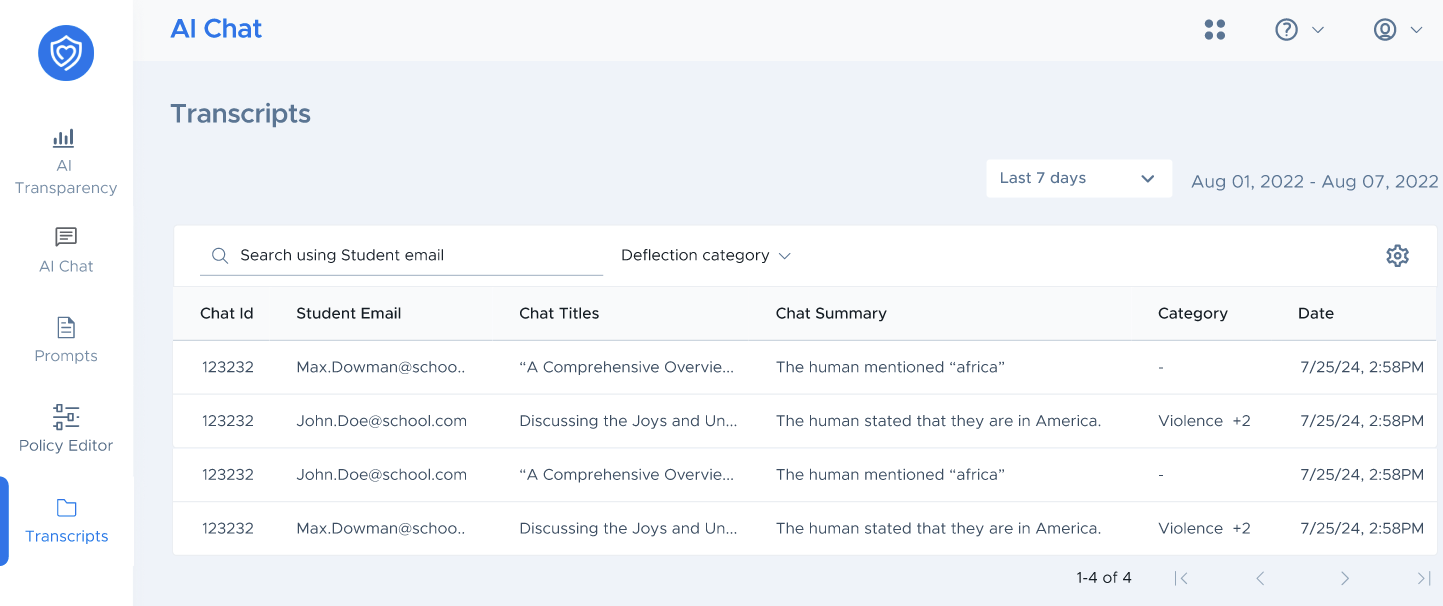
Viewing Conversations: Upon opening the History tab, you will see a list of past conversations, including details like 'Student Email', 'Date', 'Prompt Summary', and 'Chat Summary'.
Understanding the Interface
Search Function: Use the search bar at the top to quickly find specific conversations by entering keywords or phrases from the chat you're looking for.
Conversation List: This area displays the conversations in chronological order, with the most recent chats appearing first.
Prompt/Transcript Details
Student Email: The email associated with the student's account for which the chat was initiated.
Date: The exact date and time when the conversation occurred.
Prompt Summary: An overview of the conversation's topic.
Chat Summary: A short snippet or summary of the chat content for quick reference.
Reviewing Chat Histories
Selecting a Conversation: To review a specific conversation, click on the chat title or summary. This will open the full chat transcript in a new window.
Navigating Between Conversations: Use the pagination controls at the bottom of the page to move between multiple chat records.