Filter › Troubleshoot
Why are my CSV files not uploading correctly with the automated FTP upload method
You may face issues with your automated command script for FTP uploads due to a manual upload setting present in your client that asks you to disable temporary filename creation. This setting can interfere with your automated commands and cause upload failures. To avoid this please add the following to your script
resumesupport=off
Input command line to prevent Endurance transfer resume.
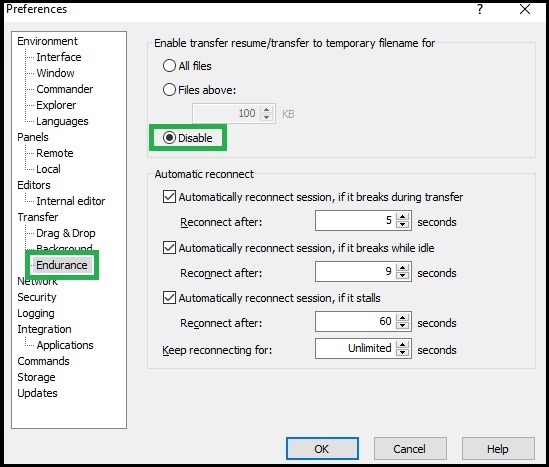
Note that Securly recommends using this setting if you plan to use a manual method for FTP upload. If the settings - "Enable transfer resume/transfer to temporary filename for" - are not disabled, the system assigns temporary filenames which could be different from those allowed by Securly and cause upload failures. (Click here to learn more about best practices for FTP upload.)