Filter › Troubleshoot
How to Disable DNS and Network Prediction Pre-fetching in Google Workspace
Sometimes, websites are logged as user activity even if users do not actually visit them. For example, a user searches for Facebook login on google.com. The user may or may not actually click the search result link for the Facebook login page, but as browsers tend to pre-fetch sites, it is logged as user activity with Securly. This can lead to an incorrect representation of user activity at times.
To bypass this issue, you can configure some settings in your Google Admin Console as outlined below:
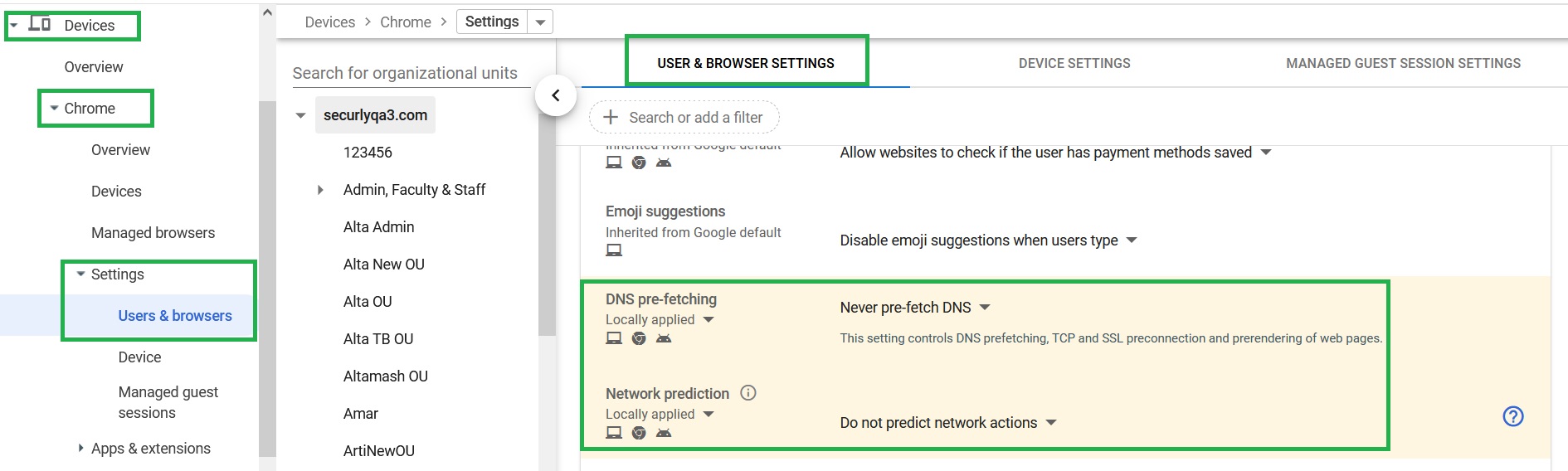
- Navigate to Devices > Chrome > Settings > Users & browsers.
- Scroll down to DNS pre-fetching and Network prediction.
- Set the DNS pre-fetching field to Never pre-fetch DNS, and configure Network prediction to Do not predict network actions.